Using QR Codes for Event Marketing and Lead Generation
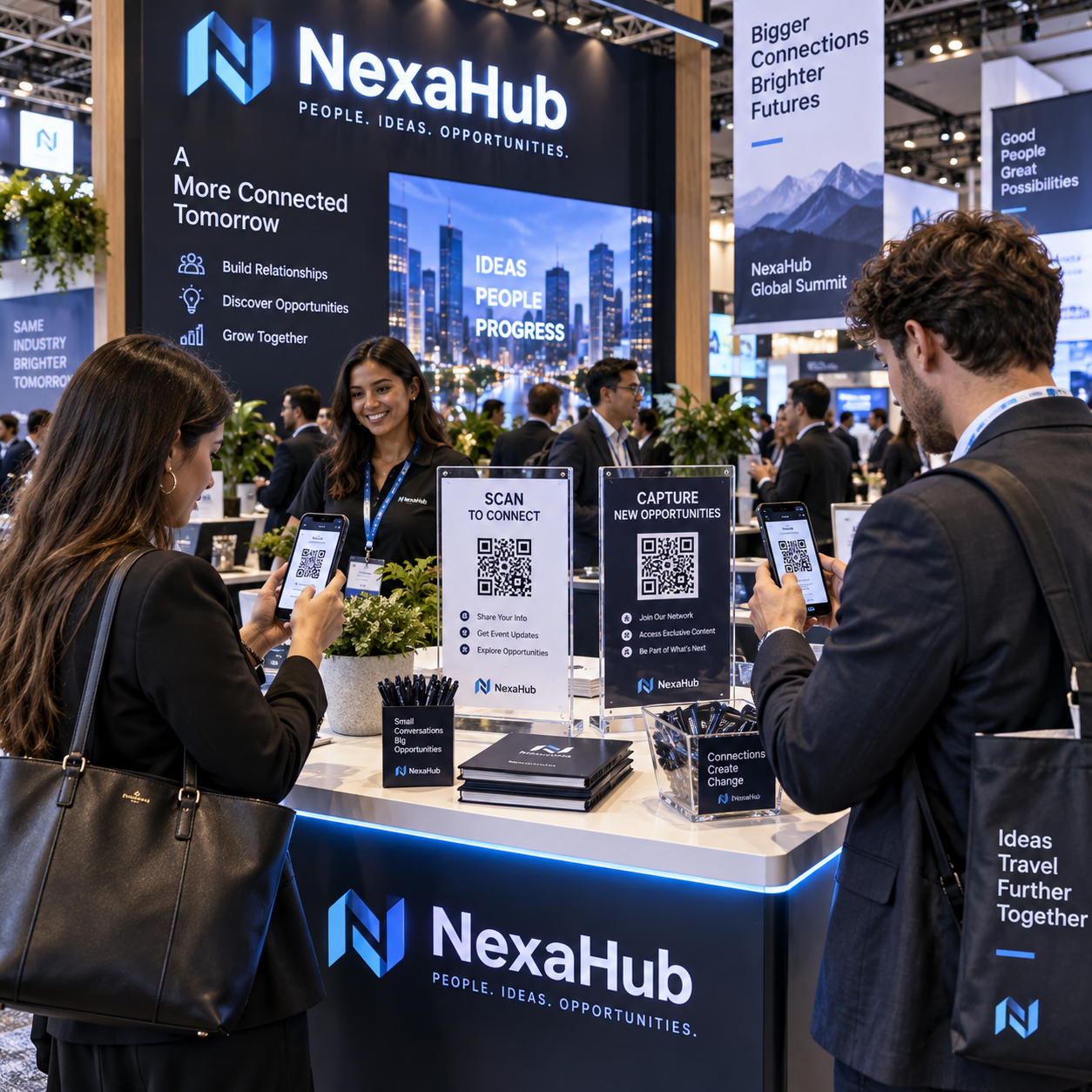
QR codes can turn an event interaction into a measurable digital journey. When attendees scan a code, they can access useful content, register for an activity, submit contact information, claim an offer, or begin a conversation with your sales team.
The code itself is only the entry point. A successful QR code campaign connects a relevant call to action (CTA), a fast mobile landing page, a simple lead-capture form, and a clear post-event follow-up process. This guide explains how to build that system for conferences, trade shows, seminars, product demonstrations, networking events, and other in-person experiences.
Why QR Codes Matter for Event Marketing
QR codes matter for event marketing because they connect physical experiences with digital engagement, measurable actions, and lead generation. A scan can move someone from a poster, booth conversation, presentation, or badge to a landing page in seconds.
Events create valuable face-to-face attention, but that attention is easy to lose once an attendee leaves the venue. QR codes provide a direct bridge between the moment of interest and the next action. Instead of asking people to type a long URL or remember a brand name, marketers can offer an immediate path to a relevant resource.
Useful destinations include a product demonstration booking page, speaker presentation, event schedule, downloadable guide, survey, discount, networking profile, or appointment calendar. Each destination should answer a practical question: Why should an attendee scan this code right now?
QR codes also make event marketing easier to measure. A printed brochure may be distributed widely without revealing what happened next. A QR code can connect scans to landing-page visits, form submissions, content downloads, and qualified leads. That visibility helps marketers compare channels and improve future campaigns.
Privacy still matters. Collect only the contact information needed for the stated purpose, explain how it will be used, and obtain appropriate consent for marketing communications. Guidance from the U.S. Federal Trade Commission can help organizations review general privacy and data-security responsibilities.
Event Marketing Use Cases for QR Codes
Event QR codes work best when each one supports a specific attendee task or benefit. Common use cases include registration, schedules, demonstrations, surveys, offers, networking, and resource downloads.
Registration and event information
Place a QR code on invitations, entrance signage, badges, or confirmation emails so attendees can register, check in, view the agenda, or receive venue information. A schedule QR code can also reduce printed materials and make changes easier to communicate.
Product demonstrations and appointments
At a trade show booth, invite visitors to scan a code to watch a short demonstration, book a consultation, or request a tailored quote. Use a CTA such as Book a 15-minute product walkthrough rather than a vague message such as Learn more.
Surveys and feedback
A code near an exit, session room, or demonstration area can lead to a short survey. Keep the form focused. Three useful questions often produce more responses than a lengthy questionnaire, particularly when attendees are moving between sessions.
Offers and resource downloads
QR codes can distribute event-only offers, research reports, checklists, case studies, or presentation slides. The value exchange should be clear: an attendee provides contact information and receives something genuinely useful in return.
Networking and contact exchange
Sales representatives and speakers can use QR codes on badges or business cards to share contact information, professional profiles, or a meeting-booking page. This reduces manual data entry and gives the recipient control over the next step.
Use separate QR codes for different use cases. A code for a speaker’s slides should not share the same destination or tracking identifier as a code for a sales consultation. Clear separation improves analytics and helps match follow-up messages to attendee intent.
How to Build a QR Code Lead-Generation Funnel
To build a QR code lead-generation funnel, connect a clear CTA to a mobile landing page, a worthwhile value exchange, a short form, and an immediate confirmation. The funnel should be planned before the QR code is printed.
- Choose one conversion goal. Decide whether the scan should generate a content download, meeting request, product inquiry, event registration, or survey response. One code can support one primary action.
- Write the value-focused CTA. Tell attendees what they will receive and how long the action should take. Examples include Get the event pricing guide, Download the speaker slides, and Claim your attendee-only consultation.
- Create a mobile-first landing page. The page should load quickly, display the benefit above the fold, and work comfortably on a phone. Remove unnecessary navigation and keep the next action obvious.
- Build a concise lead-capture form. Request only essential fields, such as name, work email, company, and one qualification question. Additional fields can reduce completion, so collect more information later through progressive profiling.
- Connect the form to marketing tools. Send submissions to a CRM or marketing automation platform, apply a source label, and trigger the appropriate confirmation or nurture workflow.
- Confirm the next step. After submission, show the promised resource immediately. If a sales representative will respond, state when the attendee can expect contact rather than making an open-ended promise.
A useful framework is SCAN: Specific CTA, Convenient destination, Appropriate data request, Next-step follow-up. If any part is weak, the QR code may generate scans without producing usable leads.
For example, a software company could place a booth QR code beside a message offering a tailored pricing worksheet. The landing page asks for a work email, company size, and buying timeframe. The CRM records the event, source location, and consent status, while marketing automation sends the worksheet and routes high-intent submissions to sales.
Where to Place QR Codes at an Event
Place QR codes where attendees have enough visibility, time, and motivation to scan them. The best location depends on the action, viewing distance, crowd movement, and surrounding message.
- Entrance signage: Link to check-in, the event app, venue directions, or the day’s schedule.
- Booth displays: Offer a demonstration, consultation, product guide, or giveaway entry tied to the booth conversation.
- Badges and lanyards: Share a speaker profile, networking page, or contact exchange option.
- Printed materials: Add a code to brochures, flyers, business cards, and handouts when the digital destination extends the printed content.
- Presentation slides: Display the code during a clear transition, such as a resource offer or audience poll. Leave it visible long enough to scan.
- Event screens: Use large, high-contrast codes during breaks or announcements. Avoid showing them briefly during dense presentation content.
- Promotional products: Use merchandise codes for evergreen resources or post-event offers, provided the code remains readable on the item.
Context-specific messaging matters. A code on a presentation screen might say Download today’s framework, while a booth sign could say Scan for a live demo. The placement earns attention; the CTA explains why the scan is worthwhile.
QR Code Design and User Experience Best Practices
An effective QR code is visible, high-contrast, large enough for its scanning distance, and linked to a fast mobile experience. Design choices should remove friction rather than compete for attention.
- Use strong contrast between the QR code and its background, and preserve the clear margin around the code.
- Size the code for its environment. A small code may work on a handout held close to the phone but fail on a distant stage screen.
- Place a short CTA beside the code so attendees know what happens after scanning.
- Keep the destination mobile-friendly, with readable text, large tap targets, and minimal loading time.
- Use a short, stable tracking URL behind the code so the destination can be updated when appropriate.
- Provide an alternative URL or verbal option for people who cannot scan, including attendees using accessibility tools.
- Test the complete journey on current iOS and Android devices, under realistic venue lighting and network conditions.
Do not cover the code with logos or decorative elements that interfere with its detection. Avoid placing it on reflective, curved, or visually busy surfaces unless testing confirms reliable scanning. Choosing a highly branded design may improve visual consistency, but excessive styling can reduce scan reliability.
Tracking and Measuring Event QR Code Performance
Measure event QR code performance across scans, visits, submissions, qualified leads, and follow-up engagement. Scan volume alone shows attention, not business value.
Assign a unique QR code or tracking link to each meaningful source, such as the entrance banner, booth counter, speaker slide, printed brochure, and event screen. This reveals which placements create activity and which produce stronger leads.
A practical measurement sequence is:
- Scans: How many people initiated the QR code interaction?
- Landing-page visits: How many scans resulted in a successful destination visit?
- Form submissions: How many visitors completed the lead-capture form?
- Conversion rate: What percentage of landing-page visitors submitted their information?
- Lead quality: How many submissions matched the target audience or buying criteria?
- Follow-up engagement: Did recipients open messages, download resources, book meetings, or respond to outreach?
Use QR platform analytics for scan tracking and web analytics for landing-page behavior. Ensure campaign parameters, source labels, and CRM fields use consistent naming. A dashboard might distinguish conference-booth from conference-speaker-slide, preventing all event activity from being grouped into one unhelpful number.
Interpret results carefully. A busy booth may produce many scans but few qualified leads, while a smaller workshop may generate fewer scans and more meeting requests. Compare the full funnel rather than rewarding the highest scan count automatically.
Post-Event Follow-Up and Optimization
Post-event follow-up should be timely, consent-based, and matched to the attendee’s scan context. Send the promised resource first, then use segmentation and marketing automation to guide relevant next steps.
Segment contacts by action and intent. Someone who downloaded a beginner’s guide should receive educational material, while someone who requested pricing or booked a demonstration may need direct sales follow-up. Include the event name, QR source, resource requested, consent status, and any qualifying response in the contact record.
A simple follow-up sequence can look like this:
- Immediately: Deliver the promised resource or confirmation and thank the attendee.
- Within one to two business days: Share a relevant insight, recap, or practical example connected to the event interaction.
- Within a week: Offer a suitable next step, such as a consultation, product comparison, or additional guide.
- After evaluation: Review performance by placement, CTA, audience segment, and lead outcome.
Do not assume that every scan represents marketing consent. Respect the permissions collected, provide an understandable unsubscribe option, and avoid adding contacts to unrelated campaigns. Data quality also deserves attention: validate email addresses, remove duplicates, and assign ownership for sales-ready leads.
Optimization should follow evidence. If a code receives scans but few landing-page visits, inspect the redirect or network experience. If visits are high but form submissions are low, simplify the page or strengthen the value exchange. If submissions are plentiful but lead quality is weak, revise the CTA, qualification question, or audience targeting.
Frequently Asked Questions About Event QR Codes
What should an event QR code link to?
An event QR code should link to a destination that matches its CTA, such as a schedule, registration page, product demonstration, survey, resource download, booking calendar, or lead-capture landing page. Avoid sending every scan to a generic homepage.
How can QR codes collect leads?
QR codes collect leads by directing attendees to a mobile landing page with a short lead-capture form. The submitted contact information can then flow into a CRM or marketing automation system, provided the attendee understands the exchange and gives appropriate consent.
Where should QR codes be placed at an event?
Place QR codes on entrance signage, booth displays, badges, printed materials, presentation slides, event screens, and promotional products. Choose locations where attendees can see the code clearly and have a relevant reason to scan.
How can event QR code scans be tracked?
Use unique QR codes or tracking links for each placement and connect them with QR analytics, web analytics, conversion tracking, and CRM source fields. Review scans alongside visits, submissions, qualified leads, and follow-up engagement.
What makes a QR code easy to scan?
A QR code is easier to scan when it has strong contrast, adequate size, a clear surrounding margin, an uncluttered background, and a mobile-friendly destination. Test it across devices, distances, lighting conditions, and venue connectivity before the event.